Firefox 138.0.1 arrives days after the last update to address two issues
Firefox 138.0.1 arrives days after the last update to address two issues
Mozilla released Firefox 138 a few days ago to the public. The release features the new profile manager that has been in development for some time.
The point update to Firefox 138.0.1 comes as a surprise. It is uncommon for a non-security update to be released shortly after another release of the web browser. In the case of non-security updates, it is usually a major problem that needs fixing right away.
First, the details:
- Firefox 138.0.1 is already available for download.
- It fixes a saving issue on the Microsoft domains office.com and live.com.
- The second fix resolves a new tab and home page issue that showed the pages as blank.
Mozilla lists two issues in the official release notes.
Fixed an issue which caused a blank page to be shown for Home and New Tab pages for some users
Some Firefox users noticed that the new tab page or home page of the browser would not display content after upgrading to Firefox 138.0. The number of affected users is unclear, but users reported the issue on sites like Reddit as well and not only to Mozilla's bug tracking service.
The issue seems to have come from a change that Mozilla made in Firefox 138, namely, turning the new tab page functionality into an add-on.
Added a workaround for a bug in outlook.office.com/outlook.live.com where attachment filenames are incorrectly prefixed with UTF-8 when saved
The second issue occurred on the Microsoft domains office.com and live.com. Users who saved attachments on these domains would notice that each saved file had the prefix UTF-8 attached to its filename.
Mozilla describes the bug in detail on the official bug tracking website. Firefox fixed the issue by adding "a webcompat intervention for Outlook" to fix the filenames of downloaded attachments.
How to obtain the update to Firefox 138.0.1
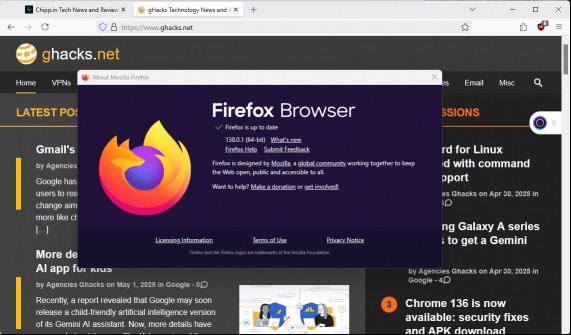
Most Firefox installations receive updates automatically. This is the case for all non-managed Firefox installations by default. Desktop users may speed up the installation of the update by selecting Menu > Help > About Firefox.
More like this
-
Open extensions on Firefox for Android will be available from December 14
 Open extensions on Firefox for Android will be available from December 14Read more
 -
Google Chrome will soon prevent malicious websites from attacking your home network
Google Chrome will soon prevent malicious websites from attacking your home networkRead more
-
If you run an old version of Windows 11, Microsoft may force-upgrade your system
If you run an old version of Windows 11, Microsoft may force-upgrade your systemRead more
-
There is a new PayPal Phishing Scam that you need to know about (using real PayPal emails)
There is a new PayPal Phishing Scam that you need to know about (using real PayPal emails)Read more
-
OneNote for Windows 10 to be discontinued by 2025
OneNote for Windows 10 to be discontinued by 2025Read more